
Sell Everything in a Room From One Photo
One photo of a room. Sell Your Room names each item, suggests a price from similar Commonplace sales or a rough estimate, and lets you list what you pick.
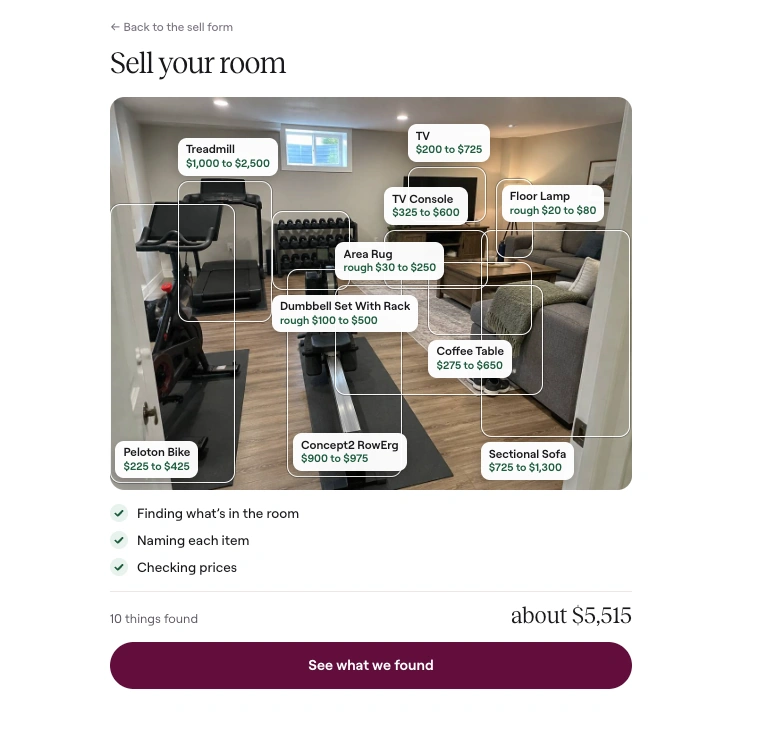
The photo above is one scan of a home office and gym corner. Sell Your Room found 10 things. The hints added up to about $5,515. That number is this room. It is not a quote for yours.
Take one photo of a room. We find what you can sell, name each item, and suggest a price. You pick what to list. Then you list that set together.
How Sell Your Room works
Open Sell Your Room. On a phone, take a photo. On a computer, choose a photo of the room. A JPG or PNG is enough.
Stand back so everything you want to sell is in the frame. In a dark room, turn on the lights or your camera flash. We never keep the photo.
The scan usually takes 20 to 40 seconds. You watch it happen. First it finds what is in the room. Then it names each item. Then it checks prices. A running total sits under the photo. Every label is a result for this photo.
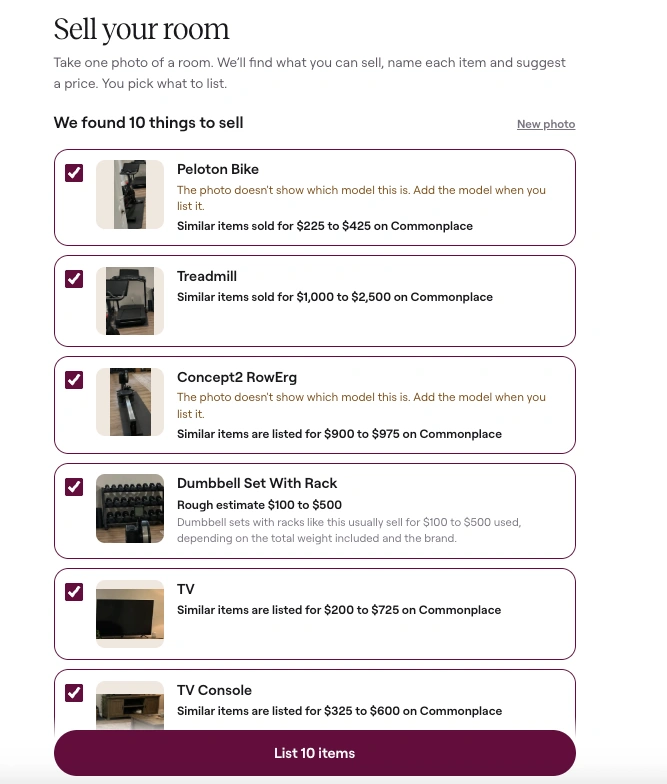
When the scan finishes, tap See what we found. You get a checklist. Items we could name start checked. Untick anything you want to keep. An item we could not make out starts unchecked. You add it only if you want to.
The button says List, then the count. In this example it says List 10 items. That one tap lines up every item you kept. The first opens in the sell form. You confirm the details and set your price. Your name, phone, and ZIP carry to the next item. When you finish one, the next is waiting. You can skip any of them.
What it finds
It looks for things people buy and sell secondhand. Furniture, fitness equipment, appliances, electronics, and large decor. A wall mirror, a rug, and a floor lamp count.
Parts of the house stay out. Walls, windows, doors, blinds, built-in cabinets, ceiling lights, and flooring are not listings. Small things stay out too. Cables, chargers, bottles, picture frames, plants, and TV remotes are skipped.
A matching set is one item. Five matching dining chairs are one listing, with a quantity. Two lamps that do not match are two items. A piece usually sold with something bigger still gets its own line. The note suggests listing them together when that piece is not worth much on its own.
The list holds at most 15 items. If the photo has more, the most valuable stay.
Each name says how we know it. Read from the label means the words are on the item. Recognized by its look means check the name when you list it. If the photo does not show the model, the note asks you to add it. If the brand is missing too, the note says the photo does not show the brand or model. If we could not make an item out, you can still list it and add close-up photos.
Pricing, and where it comes from
A price here is a hint. You set the price on the listing. The hint does not fill that field.
When similar items have sold on Commonplace, the line says so. It gives a low and a high. When the match is current listings, it says they are listed for that range. We quote a Commonplace range only when at least 10 similar listings back it up.
When there is no match, you get a rough estimate. The line says rough estimate, with a low and a high. A short note says what the range is based on. If the photo does not show the model, the estimate spans that product line. The note says the price depends on the model.
A named product can also get an online range. That happens only when Commonplace has no match, and the photo shows the model. The line says the range is from online sales. It is not presented as a Commonplace sale.
In this example, the NordicTrack treadmill showed $800 to $1,800. The UPLIFT standing desk showed $200 to $600. The floor lamp said similar items sold for $200 to $400 on Commonplace. The TV stand, recliner, rug, TV, office chair, mirror, and soundbar were rough estimates. The photo did not show the brand or model on those.
About $5,515 adds one figure from each hint. A Commonplace range contributes its middle. A rough estimate contributes the middle of its range. An online price contributes its typical figure. You still choose the price on every listing.
Price indexes by category are on the Resale Index.
When to use it
Use it when a room needs a first pass, before you decide what to list.
Moving
A move squeezes the sale into a few days. Photograph the living room, then the bedroom. You will see what is worth a listing. Furniture starts on the furniture sell page. A sofa has the sofa sell page.
Downsizing
Downsizing asks the same question with more time. What do you keep, and what should find a next home. The scan names the pieces and gives you a range before you list.
A home gym clear-out
A treadmill, a rack, and a mat are a lot to price from memory. One photo of the room is the start. Continue on the home gym sell page or the treadmill sell page. Where to sell used gym equipment covers the channel choice.
An estate
An estate can mean several rooms, and no one person who knows every piece. One photo per room is a first pass. Furniture, outdoor sets, and gym gear each have a sell page: furniture, outdoor furniture, and home gym. Where to sell outdoor furniture covers a patio set that needs a truck.
FAQ
How do I sell everything in a room?
Take one photo on Sell Your Room. Check the items you want to sell. List that set, then confirm each one in the sell form and set your price. We never keep the photo.
How much is my stuff worth?
The scan suggests a range for each item it can name. Similar items sold or listed on Commonplace come first, when there are at least 10 of them. A rough estimate fills in when there is no match. One example room added up to about $5,515. Your photo gets its own total. You set the price you will take.
Can I sell furniture from one photo?
Yes. A sofa, a desk, a dresser, and a mirror can all come from one photo when they are in the frame. Stand back so each piece shows. Start from the furniture sell page if you already know the piece.
Can I use this for a moving sale?
Yes. Photograph each room you are leaving. The list shows what is worth selling before moving day. You pick what to list. A sofa can go on the sofa sell page once you are ready to confirm it.
What should I sell when I am downsizing?
Start with the big pieces. Furniture, fitness equipment, and appliances are what the scan is built to find. Cables, bottles, plants, and TV remotes are left out on purpose. If a room is mostly keepsakes, photograph the furniture.
What if the photo does not show the model?
The list says so. You will see a note to add the model, or the brand and model, when you list it. The price is then a rough estimate, and the note says the price depends on the model. A name read from the label does not get that flag.
Sell the room
Take one photo. See what is worth listing. Keep the value. Skip the hassle.